An AHA Popped Up Because I Encountered a Problem

I've gotten into a habit of decorating my console output strings with colors, like highlighting some fragments in Yellow, Red or whatever and then switching back to White elsewhere. Each escape code sequence is relatively long (e.g. Ansi for Yellow = "\033[1;33m"). And, the pointer to the escape code has to be encased in curly brackets ({code}). Typing all that out becomes a pain.
What if ... I insert a two character, shortened escape code (akin to a bitly url) in my text, for example, a delimiter that starts with a tilda (~) and is followed by selector character in the range A-Z, a-z,0-9?

One day later --as they say in some movies-- Dunning/Kruger strikes again. Turns out I still have not mastered the "fundamentals"! Strings are non-mutable !!! That means I cannot chop a same string into smaller and smaller fragments as I had planned to do. I would have to create a new string with each truncation. That's messy. A pro would have never fallen down that rabbit hole. It appears I'm still a mistakes-generating noob.

A new day and yet more changes.
I had promised myself I wouldn't vibe code.
And yet now that I have broken my self-to-myself promise, I'm glad I did it though.
Gemini found me a Pythonic way to identify all indices of a target char in a string. In my case I'm looking for the titled quote mark under the tilda (~) on the keyboard.
Prompt used = "In Python, how to find all indices of a string where a given char is present"
AI's answer was this: The most Pythonic way to find all indices of a character in a string is by using a list comprehension with enumerate(). Other methods include using a while loop with str.find() or using the re.finditer() function.
My draft based on this:
@findex_x_() #decorator swaps order of input parameters
def findex(target = "The `yquick `gbrown `gfox `wjumps over the lazy dog" , xx = "`")
s = "banana" <-- changed to quick fox with tilted quote markers added for Yellow, Green, Red, White
char_to_find = "a" <--changed to xx = "`"
indices = [i for i, char in enumerate(s) if char == char_to_find]
print(indices)
[I would not have, could not have come up with above Pytonic code at my current level of skill]
(Query: What does enumerate do to the string? Look it up (here) and (here)
Friday: Another day and goal still not realized.
The above makes it sound like that is all I needed. Far from it.
The findex() function [whose name is an amalgamation of "find" and "index"] merely gives me a map of where the escape character xx (the tilted quote in my case) is located within the input text string. That alone does address the various "edge" cases. For example, what if I have two or more xx tags, one immediately after another? what if the selector char following xx is not in the expansion dictionary. There could be other issues I haven't thought about.
Bottom line: It sounded like a simple idea (to do the coded abbreviations) but turned out to be more complicated than my first blush assessment suggested.
One of the problems that raised its ugly head was a run away while loop --crashed my computer.
HOW TO AVOID THIS PROBLEM HAPPENING AGAIN? (above was not the first time)
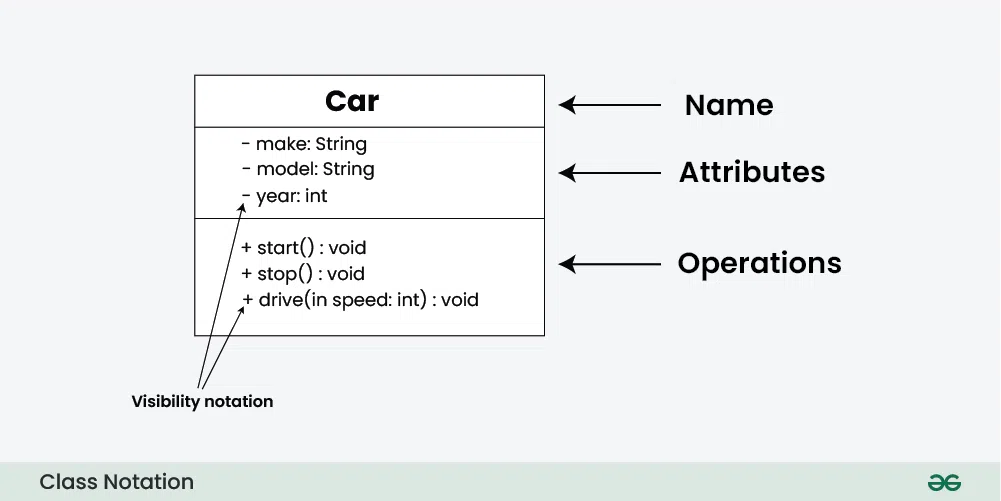
Primer on defining a class and instantiating an object from it:

(1) We ENTER the loop 100 at the top, carrying some input data (or failing to have correct data when entering)
(2) The 1st test 110 inside the entered loop 100 is whether we have bad data or no more data to process. If the state of the data is such that nothing can be done in the main loop 100, we exit and thus avoid wasting resources by executing the rest of the tests 112, 114, 116.
(3) The State 1 test 112 should test for the most likely possibility. In my case, that means, not expecting an escape code right away but rather an initial plain-text fragment.
(4) ...... TO BE CONTINUED
[Nested Loops IMAGE goes here] --Blogger not working for image insert today ????

Inside each Level 0 LOOP (a "while condition true" one or a "for i in range()" one) that is in the MAIN flow, we can have several level 1 loops nested therein and in them, level 2 loops and so on.
Here is a tracking scheme I'm thinking about:
Loop_name_list = ["L0a", "L0a_1a", "L0a_1b", L0a_1b_2a, L0b]
##The name also shows nesting level
Loop_safe_counters_list = [ 0, 0, 0, 0, 0 ] ## current count for same-indexed loop
Loop_maxcounts_list = [ 20, 20, 30, 40, 50 ] ## global safe count controls
^^__index from name:index dictionary
When a new loop is added, we append to the 4 lists
I don't fully understand OOP yet. Perhaps we can instantiate a loop count safety method?
TO BE CONTINUED
This is an evolving dialog with myself
Otherwise known as journaling my learning journey. So yes, it is valid to record my thoughts here.
I "felt" that OOP is applicable here. But I didn't know why. Now I understand better.
First I made a list of "methods" that I would like a loops tracker to implement:
(1) loop.header () ##this goes just above where the loop starts and gives identifications for the loop (e.g. a "while" loop) such as (1a) module ID, (1b) module subsection, (1c) LOOP NAME -- which also identifies the nesting level of the loop per the above concept of the 4 iterables (3 lists & 1 dictionary)
(2) loop.check () ## this goes just below where the loop starts (e.g. right after the "while" statement and performs a check on the current loop count of the identified / named loop to make sure it is not above the max count allowed for the loop. [In the future, the loop.check method can also test for memory overload due to generating of too many immutables (aka strings) by the loop by adding up the lengths of the generated strings and assuring the sum is not greater then max_strings_len]
(3) loops.tracking_extend () ## add a new loop to the 4 lists
loop.get_count()
loop.adjust_maxcount()
ATTRIBUTES:
loop.names_list
loop.counters_list
loop.maxcounts_list
loop.index_lookup_dict
loop.moduleID
loop.module_sectionID (e.g. function name)
Instances of the class: loops_tracker are created for each MAIN flow line such as may occur inside a function or inside any module
TO BE CONTINUED ....
One more day later.
Cool. My first rolled class works !! Well, at least partially.
What I had to get into my head was that the "attributes" get set when I instantiate the object.
I don't have to set them inside the class definition:
Here is part of the code: (left click to enlarge, back to return)

and here is some of the output on the console corresponding to the above code

So some of the simpler methods inside the Loops_Tracker object are working
TO BE CONTINUED ....
The plan is for the loop.head method to check for loop.name to already be inside the internal lists (attributes) and if not, to ask the user to provide them.
I'm guilty -- a self reflection
At times on Reddit, I advise other noobs to write pseudo code first before trying to convert to actual code.
Truth is, I'm often guilty of the same thing.Take my planned loop.head() method.
It should look like this in the code flow:
prior_code
loop_name = "unique_name"
loop.head(loop_name)
while or for statement:
loop.head(loop_name)
subsequent code
The loop.head method takes in just the loop_name; for example, "L0a" or "L0b" or "L0c.1a". However, loop_name can be ANY unique name including the editor's LINE NUMBER for where the "while" or "for" statement resides !!!
There are two possibilities: (1) The loop_name has already been added to the {name:index} lookup dictionary by previously executed code, generally because loop.head() ran earlier in time for the same loop_name; OR (2) The loop_name is not yet found in the {name:index} dictionary because this is the first time loop.head() is being executed for that specific loop_name.
In either case, (1) or (2), we will want to set loop_count(index) = 0 for that loop_name before executing the "while" or "for" statement.
If case (2) is true, we need to add the newly encountered loop_name to the {name:index} lookup dictionary We also need to add the newly encountered loop_name to the loop_names list at the next available end slot of that list
(Query: How do you add a new k:V pair to a dictionary? Do I remember? No. Look it up in GeeksForGeeks (or W3 schools). See below More to Explore section
Answer: see G4G here: Add a key value pair to Dictionary in Python
Postscript: I have now added a test case while loop into my scratch_05 code, discovered an error in my class definition: can't have a single loop_name as an attribute!!! Only the expandable list of names. Too much brain strain at moment to deal with it. Reason: my brain has been hijacked by OCD of collecting website links = easy dopamine hits but no substantive growth See for example this --> Why You Can’t Focus Anymore
Instead of going into "frustration" mode with my failing loop tracker class, what I needed to do -- and eventually did -- was pose the error message to Google's Gemini AI:
"TypeError: object.method() takes 1 positional argument but 2 were given"
And behold: Google provided the answers, for example from Karma (here):
Python typically means you're passing an extra argument when calling a method, or, more commonly, you forgot to include self in the method's definition
My test code is now working

The loop.header() method is run before entering the "while" loop, intaking a new loop_name
The loop.check() method is run after entering the "while" loop, to test the new loop_name for a max count violation
The checked loop is set to cycle 50 times, but the max count limits it to 5 cycles
This is seen in the below --vvv-- image of the console output:

That max-count parameter can be -1, in which case we copy the max value from entry to the left
Or if max_count = +1, we copy current max value of entry to the right
After correcting some code typos, the test run is working agin
TO BE CONTINUED ....
MORE TO EXPLORE
AI ANSWER: Yes, a Python decorator can be used to effectively change the order in which parameters are supplied to the decorated function's underlying logic. A decorator works by wrapping the original function with a new wrapper function that can handle argument manipulation before calling the original function with the desired parameter order.
---^^^--- Python Programming for Beginners (10 videos)
---^^^--- Advanced Python Programming (5videos)
---^^^--- Using Functions as First Class Objects (associated GitHub [here])
G4G answer: Add a key value pair to Dictionary in Python
YT search results: "How to add a new KV pair to a python dictionary"


Comments
Post a Comment